
SS IPTV / SSIPTV Alternative for Windows
Users searching SS IPTV, SSIPTV, IPTV Player Zero, or other alternative player names may want a focused Windows IPTV player with a trial and clear source support.

Windows IPTV setup
Compare the Windows workflow before choosing a player
SS IPTV, SSIPTV, IPTV zero, IPTV Player Zero, and Hot IPTV Windows searches can mean users are comparing player interfaces, device support, playlist handling, and legal source requirements.
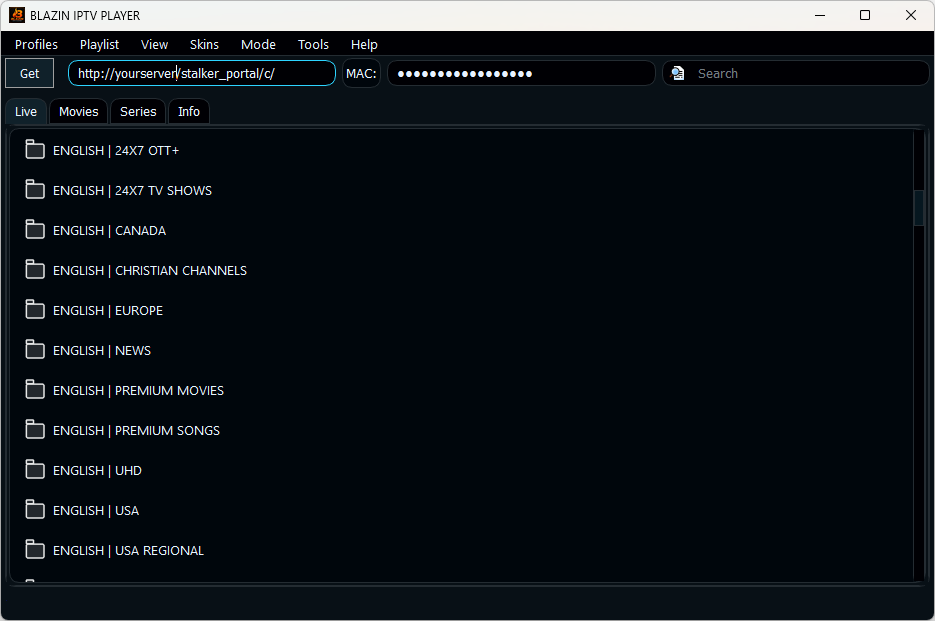
BLAZIN IPTV Player focuses on Windows 11 and Windows 10 with M3U, M3U Plus, Xtream Codes, STB MAC, Stalker Portal, EPG, favorites, search, themes, and a 7-day Microsoft Store trial.
- Windows-first layout
- 7-day trial
- M3U, Xtream, STB MAC and Stalker
- Legal playlist required
Feature match
What to test in BLAZIN IPTV Player
SSIPTV alternative on PC
Use a Windows desktop player when you want categories, search, favorites, EPG, and profile setup in one app.
IPTV Player Zero alternative
Compare BLAZIN IPTV Player if you are searching for IPTV Player Zero or IPTV zero on Windows.
Transparent legal boundary
BLAZIN IPTV Player does not provide channels or subscriptions.
Trial before deciding
Install from the Microsoft Store and test with your own legal source for 7 days.
Common wording
Related terms covered by this page
These terms can mean different apps, platforms, or source types. This page only describes BLAZIN IPTV Player for Windows and legal user-provided IPTV sources.
ss iptv, ssiptv, iptv zero, iptv player zero, hot iptv windows, iptv player zero alternative, iptv smarters, iptv player
FAQ
Frequently Asked Questions
Is BLAZIN IPTV Player the same as SS IPTV or SSIPTV?
No. This is a comparison/alternative page for Windows users. BLAZIN IPTV Player is separate player-only software.
Can I import my own playlist?
Yes, when your source is legal and compatible. The app supports M3U and other common source types.
Does the app provide IPTV channels?
No. It plays sources you are legally authorized to use.
Does BLAZIN IPTV Player include channels?
No. It is player-only software. You must provide your own legal playlist, account, or portal details.
Which Windows versions are supported?
BLAZIN IPTV Player is built for Windows 11 and Windows 10.
Related guides
Continue comparing Windows IPTV setup options
Windows IPTV Player
Start with the main Windows IPTV player guide for BLAZIN IPTV Player.
Download / 7-Day Trial
Install from the Microsoft Store and test the app with your own legal source.
IPTV Stream Player
Review live stream, playlist, and playback workflow support on Windows.
IPTV App for PC
Compare app-style IPTV setup for Windows PCs and laptops.
IPTV Smarters Alternative
Compare a Windows desktop workflow for users searching Smarters-style terms.
IPTV para PC
International PC setup terms for Windows IPTV player users.
7-Day Free Trial
Try BLAZIN IPTV Player with your own legal source
Install from the Microsoft Store, add your own playlist or portal details, and test the Windows IPTV player before deciding.
BLAZIN IPTV Player is player-only software. It does not provide channels, playlists, streams, provider accounts, or copyrighted content.