
Windows IPTV Player Feature Guide
BLAZIN IPTV Player Features for Windows
BLAZIN IPTV Player is Windows software for people who bring their own legal streaming source. The interface keeps profiles, browsing tools, guide data, and playback settings together on the desktop.

Current release • Version 1.1.18.0
Faster guide loading, stronger provider handling, and updated browsing
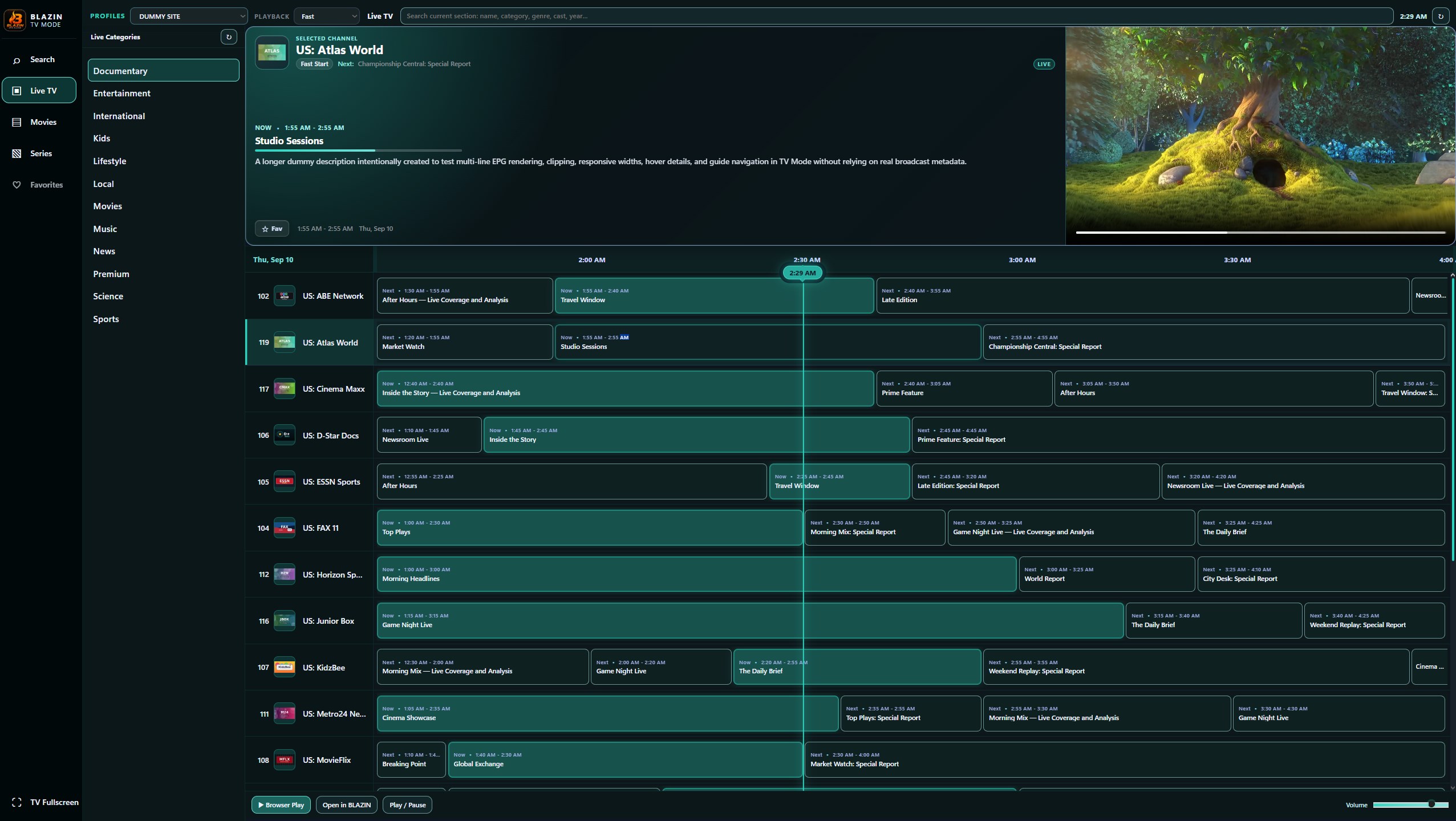
Version 1.1.18.0 builds on the Windows desktop and TV Mode experience with faster loading, reworked EPG handling for Xtream Codes and Stalker Portal, an updated Profile Manager, and improved Movies and Series browsing.
- Reworked Xtream Codes and Stalker Portal EPG loading and reliability.
- Faster playlist and category loading across supported source types.
- Updated Profile Manager for saved source profiles.
- Movies and Series stacked-card views with artwork and descriptions where supplied.
- Expanded CPU and GPU monitoring plus the existing Windows desktop and TV Mode workflows.
Redesigned internal player
The compact VLC-based internal player has an updated interface, background player loading, and GPU-assisted playback where supported by the Windows system.
Fullscreen control upgrades
Fullscreen playback adds a channel-name marquee and Up/Down Arrow channel switching, with improved control alignment when resizing and new corner grips.
Playlist files in Profile Manager
Local playlist files can now be kept in the Profile Manager alongside compatible Xtream Codes, STB MAC, Stalker Portal, and M3U URL profiles.
Actual app capabilities
Core BLAZIN IPTV Player features
These capabilities are available in the current Windows desktop build and can be tested with your own compatible source.
M3U and M3U Plus support
Load a local M3U file or remote M3U URL, then organize legal user-provided streams into Live TV, Movies and Series areas where the playlist data supports those groups.
Xtream Codes API login
Use a server URL, username and password to load categorized Live, Movies and Series sections, including compatible EPG maps and media metadata from the provider API.
STB MAC and Stalker Portal
Connect with compatible portal URLs and MAC details, including Stalker Portal workflows for users who need a Windows alternative to set-top-box style access.
EPG guide support
Use provider guide data or compatible XMLTV-style EPG metadata to show schedule information, channel tooltips and program details where your source provides them.
Internal VLC and external player options
Use the redesigned VLC-based internal player with background loading and GPU-assisted playback where supported, or launch a compatible external media player when your Windows setup needs a separate playback path.
Profiles for repeat setups
Save and filter STB MAC, Stalker, Xtream, M3U URL, and local playlist-file profiles so the same IPTV source does not need to be re-entered each time.
Custom User-Agent controls
Set request User-Agent and playback User-Agent values for sources that require specific request headers or player behavior.
Favorites, search and categories
Use compact category lists, clear search, favorites, Live TV, Movies and Series tabs to move through large channel lists faster.
33 desktop theme presets
Choose from dark, medium and light desktop theme presets, including Blue Grey, Graphite Steel, Storm Blue, Deep Ocean, Nord Light and other color options.
Performance and stability
Built for large Windows IPTV playlists
Large playlist handling
- Background loading with Qt worker threads and bounded request concurrency.
- Fast mode for very large Live or ALL channel lists.
- Chunked list painting to keep the interface responsive on big playlists.
- Poster and logo cache handling to reduce repeated image work.
Source safety and limits
- Player-only app: no IPTV channels, subscriptions or copyrighted streams are included.
- User controls their own legal playlist, account, portal and playback setup.
- Timeouts and request limits are used to avoid provider API hangs on large data sets.
- Microsoft Store installation keeps download and trial access simple.
Advanced Stalker and portal controls
Advanced Stalker Portal settings for compatible sources
For users who need more than a basic MAC field, BLAZIN IPTV Player includes optional advanced Stalker fields. Leave these blank unless your provider requires specific STB profile values.
Device identity fields
Optional serial number, fake MAC for profile requests, STB model, STB revision, device ID and device ID2 fields.
Portal profile fields
Optional profile version, portal version, hardware version, hardware hash, signature and PHP session details.
Timezone and metrics
Optional timezone, metrics random value and custom metrics JSON for portals that require exact profile metadata.
7-Day Free Trial
Try the Windows IPTV player with your own legal source
Install BLAZIN IPTV Player from the Microsoft Store, add your own legal M3U, Xtream Codes, STB MAC or Stalker Portal details, and test the app before deciding.
BLAZIN IPTV Player does not provide channels, IPTV accounts, subscriptions, playlists or copyrighted content.