
BLAZIN IPTV Player User Guide
Use this quick guide to choose the right source type, test your own legal source during the free trial, and troubleshoot common Windows IPTV setup questions.

Recommended trial workflow
- Install the app from the Microsoft Store.
- Choose your source type: M3U, M3U Plus, Xtream Codes, STB MAC, or Stalker Portal.
- Add only legal sources you are authorized to use.
- Check categories, EPG, movies, series, playback, search, favorites, and themes.
- Use the 7-day window to decide whether the app fits your Windows setup.
TV Mode
How to Use BLAZIN TV Mode
TV Mode gives BLAZIN IPTV Player a large-screen interface for Live TV, Movies, and Series. It is designed for TVs, large monitors, mini PCs, and couch-style keyboard or remote navigation while continuing to use the profiles and legal sources you add to the desktop app.
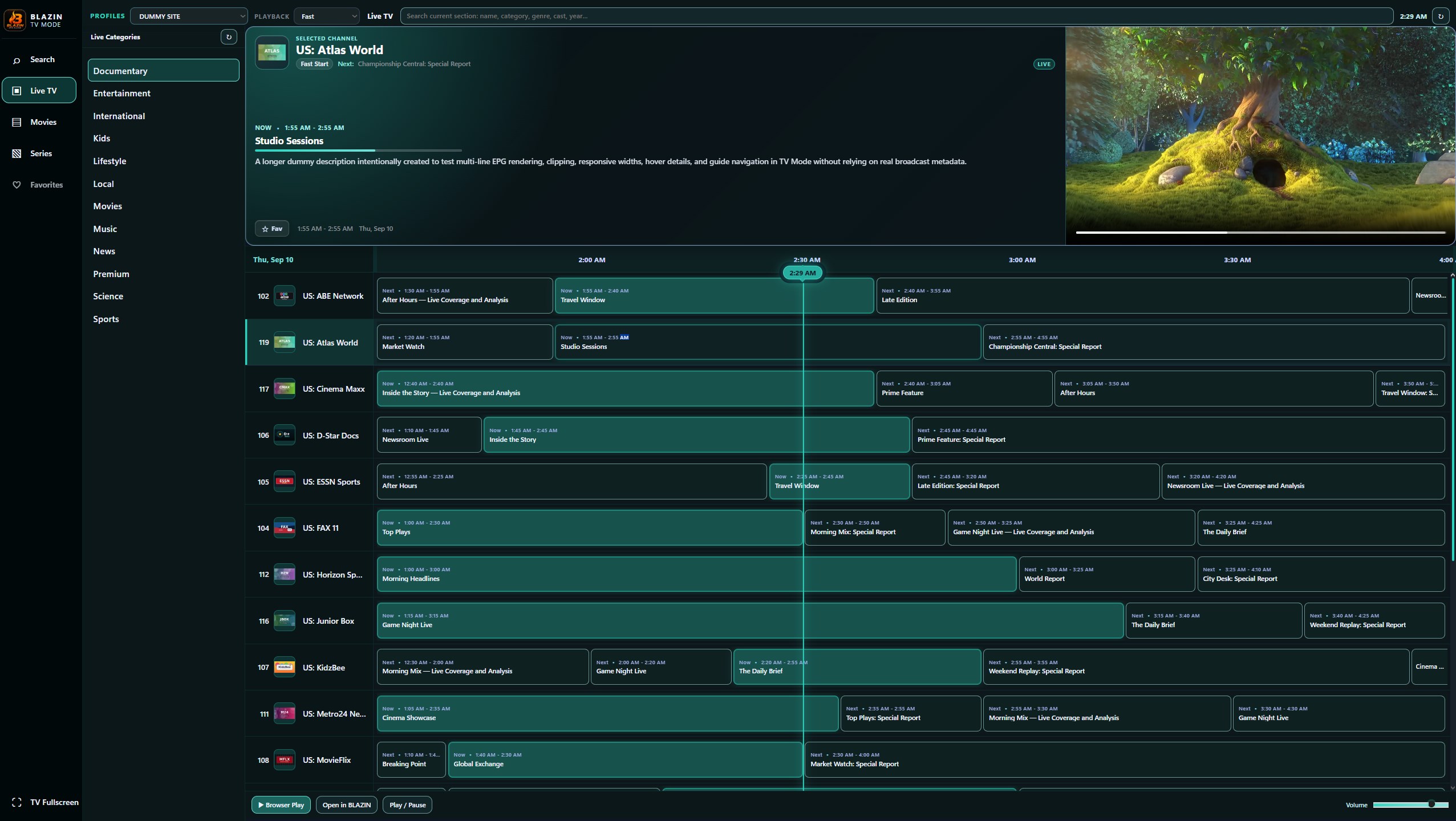
TV Mode — Live TV + EPG
Browse categories and channels on the left, view the selected channel and program information, and use the EPG timeline when guide data is supplied by your source.
Opening TV Mode
- Load your playlist, portal, or saved profile in BLAZIN IPTV Player.
- Open the View menu and choose Open Browser TV Mode.
- TV Mode opens using the source or saved profile available from the desktop app.
- Choose Live TV, Movies, or Series from the left navigation rail.
- Select a category, then select the channel, movie, series, season, or episode you want.
- Press Enter or use the on-screen Play control to start playback.
Browsing Live TV
Choose a Live TV category and move through the channel list. When your source supplies EPG information, TV Mode can show the current program, upcoming programs, description, timing, and EPG timeline. Selecting another channel updates the program information for that channel.
Browsing Movies and Series
Movies and Series use a poster-focused large-screen layout. Choose a category, move through the artwork, and select an item to view available details. For Series, select the series first, then choose a season and episode when those details are supplied by your source.
Search and Favorites
Use Search to quickly filter the current TV Mode section. Favorites let you return to channels, movies, or series you use often without browsing the full source again.
TV Mode Keyboard Controls
F— enter or leave fullscreen TV Mode.G— open the Guide / EPG view for Live TV.↑/↓— move to the previous or next item. During supported fullscreen Live TV playback, use Up/Down to change channels.←/→— move across TV Mode rows and grids.Enter— open or play the currently selected item./— open Search in Browser TV Mode.Esc— close Search or the playback view, or leave fullscreen where applicable.
Fullscreen Live TV Channel Switching
When Live TV is playing in the BLAZIN internal player, press F for fullscreen. While remaining fullscreen, press ↑ for the previous channel or ↓ for the next channel. The channel-name marquee appears briefly after the channel changes so you can confirm what is playing without leaving fullscreen. Press Esc to exit fullscreen.
TV Mode displays information supplied by your own compatible source. BLAZIN IPTV Player does not provide channels, playlists, streams, subscriptions, provider accounts, or copyrighted content.
Related Windows IPTV Guides
Continue Comparing Setup Options
Windows IPTV Player
Review this related BLAZIN guide for source setup, Windows workflow details, legal notes, and trial testing.
Best IPTV Player for Windows 11
Review this related BLAZIN guide for source setup, Windows workflow details, legal notes, and trial testing.
M3U Player for Windows
Review this related BLAZIN guide for source setup, Windows workflow details, legal notes, and trial testing.
M3U Plus Player
Review this related BLAZIN guide for source setup, Windows workflow details, legal notes, and trial testing.
Xtream Codes Player
Review this related BLAZIN guide for source setup, Windows workflow details, legal notes, and trial testing.
STB MAC Player
Review this related BLAZIN guide for source setup, Windows workflow details, legal notes, and trial testing.
Stalker Portal Player
Review this related BLAZIN guide for source setup, Windows workflow details, legal notes, and trial testing.
IPTV Player with EPG
Review this related BLAZIN guide for source setup, Windows workflow details, legal notes, and trial testing.
IPTV Player Zero Alternative
Review this related BLAZIN guide for source setup, Windows workflow details, legal notes, and trial testing.
IPTV Smarters Alternative
Review this related BLAZIN guide for source setup, Windows workflow details, legal notes, and trial testing.
TiviMate Alternative
Review this related BLAZIN guide for source setup, Windows workflow details, legal notes, and trial testing.
VLC IPTV Player
Review this related BLAZIN guide for source setup, Windows workflow details, legal notes, and trial testing.
7-Day Free Trial
Use the User Guide During the Free Trial
Install from the Microsoft Store, add your own legal playlist or portal details, and test the Windows IPTV workflow before deciding whether it fits your setup.
BLAZIN IPTV Player is player-only software. It does not provide channels, playlists, streams, provider accounts, or copyrighted content.