
You want a Windows-first player
BLAZIN's documented platform is Windows 10 and Windows 11. Its layout, profiles, local file selection, and external-player paths are built around a PC rather than adapted from a phone or TV interface.
This comparison is for Windows users who already have a legal IPTV source and are choosing between BLAZIN IPTV Player and an IPTV Smarters Pro or Smarters-style application. The Smarters name appears across products and platforms, so the exact app and version matter. A statement that applies to one listing may not apply to every Smarters product.
Official sources reviewed for this guide verify M3U playlists, local or remote user content, single stream URLs, Xtream Codes, EPG, Live TV, Movies, Series, stream logos, search, and external-player features in at least some IPTV Smarters Pro versions. They did not verify STB MAC, Stalker Portal, custom user-agent, or advanced portal fields, so the table marks those claims as unverified rather than absent.
Quick comparison
This BLAZIN IPTV Player vs IPTV Smarters Pro comparison is written for Windows users who want to evaluate source compatibility, desktop organization, guide data, and playback. Smarters features vary by product, version, and platform.
| Feature | BLAZIN IPTV Player | IPTV Smarters Pro |
|---|---|---|
| Windows desktop focus | Designed for Windows 10 and Windows 11 | Reviewed official sources describe Smart TV and mobile versions; Windows-first desktop positioning was not verified |
| M3U playlist | Local M3U files supported | Current terms document user-created M3U playlists and local content |
| M3U URL / M3U Plus | M3U and M3U Plus URLs supported | Single stream URLs and remote sources are documented; confirm exact playlist formats by version |
| Xtream Codes | Supported | Verified in the official Samsung listing and current terms |
| STB MAC / Stalker | Dedicated STB MAC and Stalker Portal workflows | Not verified in the official sources reviewed; check the exact product and version |
| EPG / TV guide | Shown when compatible data comes from the user's source | EPG is documented; current terms also list external EPG sources as a premium feature |
| Live / Movies / Series | Separate sections when the source provides them | Verified in the official Samsung listing |
| Favorites and search | Both included | Master Search is documented as a premium feature; favorites were not verified in the sources reviewed |
| Logos and posters | Shown when supplied by the source | Stream logos plus movie and series information are documented |
| External players | VLC and MPC-HC/MPC-BE style workflows | Adding an external player is documented as a premium feature; exact platform support varies |
| Custom user agent | Supported | Not verified in the official sources reviewed |
| Advanced portal fields | Advanced Stalker/STB compatibility controls | Not verified in the official sources reviewed |
| Themes | Themes and skins included | Appearance options vary by product |
| Microsoft Store trial | 7-day free trial | Current terms describe basic and premium access; check the exact product listing and terms |
| IPTV content included | No | No; the official listing and terms say users provide their own content |
BLAZIN's clearest distinction is its Windows-first positioning. Profiles, playlist files, portal settings, categories, search, favorites, and internal or external playback are presented as one Windows 10 and Windows 11 desktop workflow.
IPTV Smarters Pro is familiar to many users. The official Samsung listing verifies Xtream Codes, EPG, Live TV, Movies, Series, stream logos, and a built-in player, while current terms document M3U playlists, search, external EPG, and external-player features. Exact behavior still varies by product and version.
The better fit depends on what the user already knows, which platform is required, and whether advanced Windows playback or portal compatibility controls matter. This guide does not assume that a Smarters version lacks a feature simply because its interface differs from BLAZIN.
Decision guide
BLAZIN's documented platform is Windows 10 and Windows 11. Its layout, profiles, local file selection, and external-player paths are built around a PC rather than adapted from a phone or TV interface.
BLAZIN combines STB MAC and Stalker Portal logins with a custom user agent and advanced compatibility fields. That may matter when a portal requires more detailed profile values than a basic server-and-MAC form.
BLAZIN can play internally or pass a selected item to VLC, MPC-HC, or MPC-BE style configurations. This is useful for users who already maintain a preferred Windows playback chain.
A balanced comparison
Familiarity has value. If a specific Smarters version already loads your source, preserves your favorites, and works on your devices, staying with it can be simpler than rebuilding profiles elsewhere.
Some lawful sources provide setup directions for a named client. Following those instructions may reduce ambiguity, provided the listing and source are legitimate and the version matches.
A Smarters-style product may be preferable if you have confirmed that the same version supports the other devices you use. Do not assume every product carrying similar branding has identical features.
Recommendation
BLAZIN is the clearer choice when the priority is a documented Windows 10/11 desktop product with M3U Plus, STB MAC, Stalker Portal, custom user-agent settings, advanced portal fields, Windows external-player paths, and a Microsoft Store trial. A verified Smarters version may fit better when the user already knows its interface or needs its documented mobile or Smart TV workflow.
Check the exact Smarters developer, platform, listing, and version. The official sources reviewed do not justify treating every Smarters-branded application as one identical product.
Detailed review
BLAZIN supports M3U files, M3U URLs, M3U Plus, Xtream Codes, STB MAC, and Stalker Portal. The official Smarters sources reviewed verify M3U, local or remote user content, single stream URLs, and Xtream Codes. They did not verify STB MAC or Stalker Portal, so check the exact product rather than assuming support or absence.
When the source supplies compatible data, BLAZIN separates Live TV, Movies, and Series, retains categories, and provides search and favorites. Smarters-style applications commonly offer similar high-level organization, but the layout and exact controls vary among versions.
BLAZIN displays EPG, channel logos, movie posters, and series posters only when the user's source supplies them. The official Samsung Smarters listing documents EPG, stream logos, movie information, and series information. Either app still depends on source data.
BLAZIN includes an internal player and Windows external-player options. Its custom user agent and advanced portal fields are documented product features. For a Smarters product, review the current listing or documentation for equivalent playback and compatibility settings rather than relying on the family name alone.
PC experience
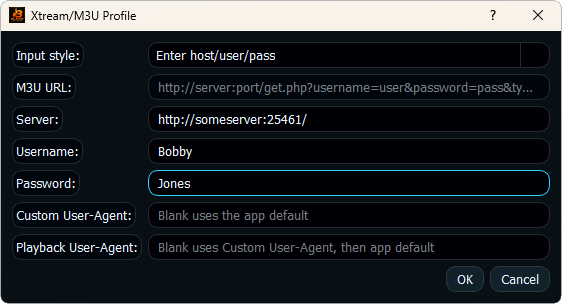
BLAZIN's Windows workflow starts with a source profile. Users can open a local playlist, paste an M3U or M3U Plus URL, enter Xtream Codes credentials, or configure an STB MAC or Stalker Portal. Once loaded, available sections and categories remain inside a compact desktop interface.
Search and favorites help with larger lists. Internal playback keeps viewing in the application, while external playback lets a Windows user keep VLC, MPC-HC, or MPC-BE as the final player. Themes and skins provide visual choices without changing the connection method.
A Smarters-style app may present many of the same broad concepts, but Windows behavior depends on the exact product. Compare window sizing, keyboard and mouse navigation, profile storage, external player selection, and how the app handles your actual source.
Bring your own source
BLAZIN's supported sources are explicit: local M3U playlist files, remote M3U playlist URLs, M3U Plus URLs, Xtream Codes login, STB MAC login, and Stalker Portal login.
The reviewed official Smarters materials document user-created M3U playlists, local or remote user content, single stream URLs, and Xtream Codes. They did not verify STB MAC or Stalker Portal support. Check the developer, platform, and exact input fields before installing.
For either option, the player cannot correct invalid credentials or create data the source does not send. Test EPG, categories, logos, posters, Movies, and Series with the authorized source you actually intend to use.
Important legal note
The word 'player' is important in this comparison. The official Smarters listing and terms say IPTV Smarters Pro does not provide content or playlists and displays user-added content.
BLAZIN IPTV Player does not provide IPTV channels.
BLAZIN IPTV Player does not provide playlists.
BLAZIN IPTV Player does not provide subscriptions.
BLAZIN IPTV Player does not provide provider accounts.
Users must provide their own legal IPTV source.
Verification
FAQ
No. BLAZIN is a separate Windows IPTV player.
No. Features vary by product, version, and platform. Review the exact Smarters listing for the capabilities you require.
BLAZIN supports both. Public listings show these inputs are commonly supported by Smarters-style apps, but confirm the exact version.
Those items depend on data supplied by the user's source and on how the current app version interprets it.
Yes. BLAZIN offers a 7-day free trial through Microsoft Store so you can test your own legal source.
Related guides
See every supported BLAZIN source type in one Windows overview.
Evaluate BLAZIN against a cross-platform IPTV player.
Walk through the server, username, and password profile workflow.
Microsoft Store
Try BLAZIN beside the specific Smarters app you are considering and compare profile setup, desktop navigation, guide data, and playback.