
M3U IPTV Player
Open local M3U files, remote M3U URLs, M3U8-compatible playlists and M3U Plus sources.
BLAZIN IPTV Player is a native Windows IPTV player for people who already have a legal source. Use M3U and M3U Plus playlists, Xtream Codes, STB MAC or Stalker Portal details, then browse compatible Live TV, Movies, Series, EPG, categories, search, favorites, logos and posters on your PC.
Current release • Version 1.1.18.0
Version 1.1.18.0 improves EPG handling for Xtream Codes and Stalker Portal, speeds up playlist and category loading, updates the Profile Manager, and adds refreshed Movies and Series stacked-card browsing.
See the current feature list or test the app with your own legal source during the 7-day Microsoft Store trial.
Built for Windows PC
BLAZIN runs as a Windows desktop application. It is designed for keyboard, mouse and large-screen PC use rather than forcing a mobile IPTV interface through an emulator.
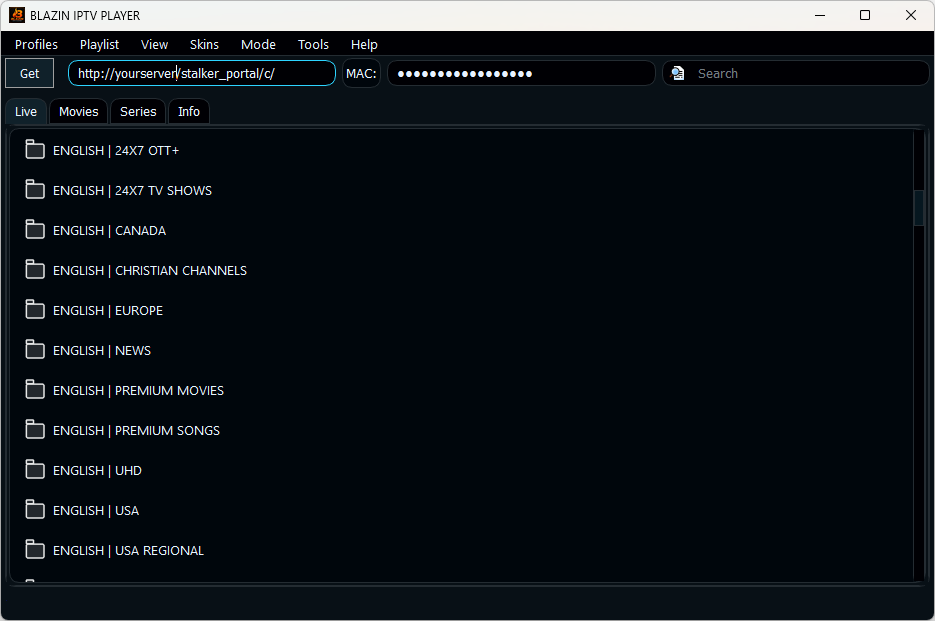
Supported source types
Open local M3U files, remote M3U URLs, M3U8-compatible playlists and M3U Plus sources.
Use the server URL, username and password supplied by your legal source.
Use authorized portal and MAC-style source details in a Windows workflow.
Use portal details and compatibility settings for legitimate Stalker source access.
Everyday features
Display compatible program guide information when your source provides it. See the Windows IPTV EPG guide.
Find items in large source libraries and save the channels, movies or series you use most.
Display compatible channel logos and VOD artwork supplied by your source.
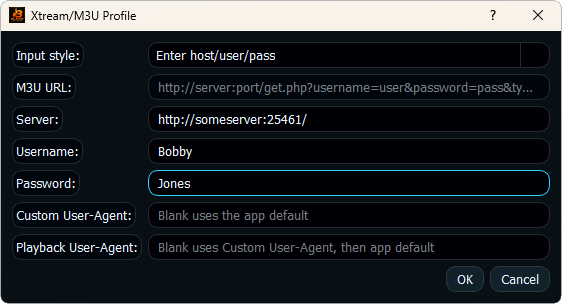
Playback choice
Use BLAZIN's internal player for in-app playback, or configure an external Windows player workflow such as VLC, MPC-HC or MPC-BE when that better fits your setup.
The 7-day trial lets you compare playback with your own source before buying.
Why BLAZIN
If you use more than one legal source format, you do not need a separate Windows application for every login type. BLAZIN combines playlist, account and portal workflows with a consistent desktop interface.
Start with the connection guide that matches your source: M3U, Xtream Codes, STB MAC or Stalker Portal.
FAQ
Yes. BLAZIN is a native Windows IPTV player for Windows 11 and Windows 10.
No. BLAZIN runs directly as a Windows desktop application.
BLAZIN supports user-provided legal M3U, M3U Plus, Xtream Codes, STB MAC and Stalker Portal workflows.
No. BLAZIN is player-only software and does not provide channels, playlists, subscriptions or provider accounts.
Yes. BLAZIN offers a 7-day free trial through Microsoft Store.
Microsoft Store
Install the native Windows app and test your own legal source on your PC.