IPTV Player for Windows 11 and Windows 10
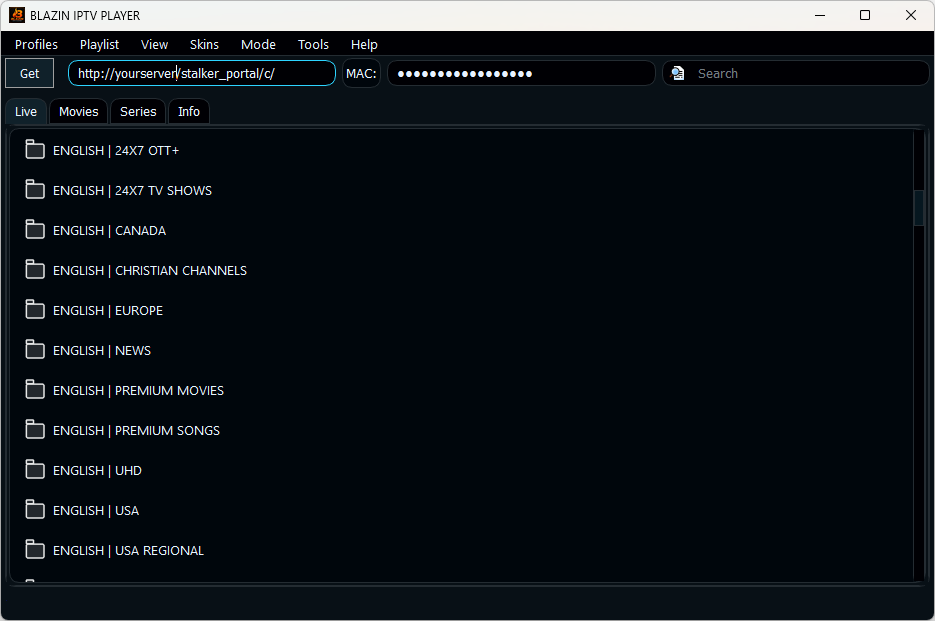
BLAZIN IPTV Player is a fast, compact Windows IPTV player for users who want to load their own legal M3U playlist, M3U Plus source, Xtream Codes login, STB MAC portal, or Stalker Portal source in one desktop app.
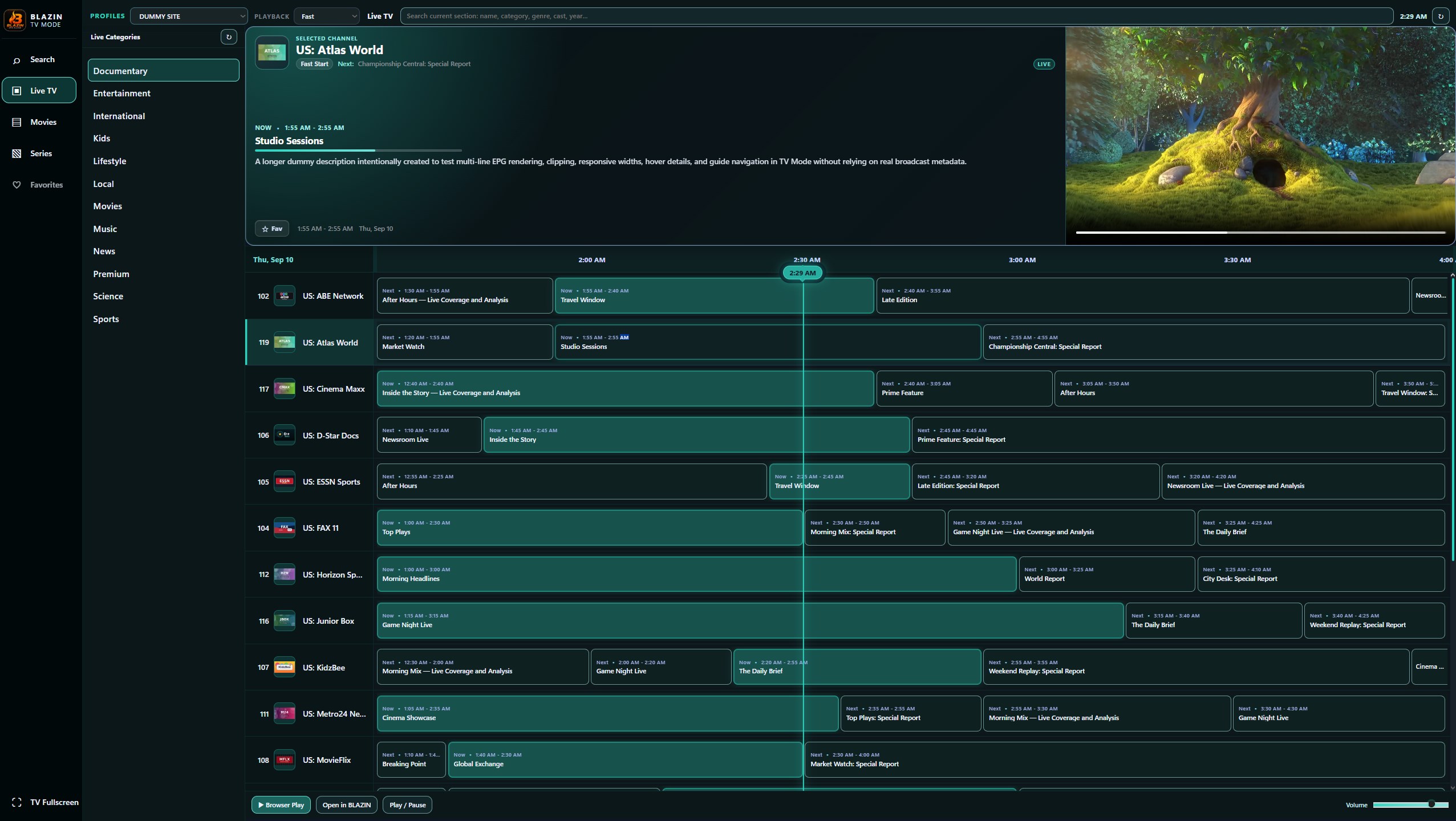
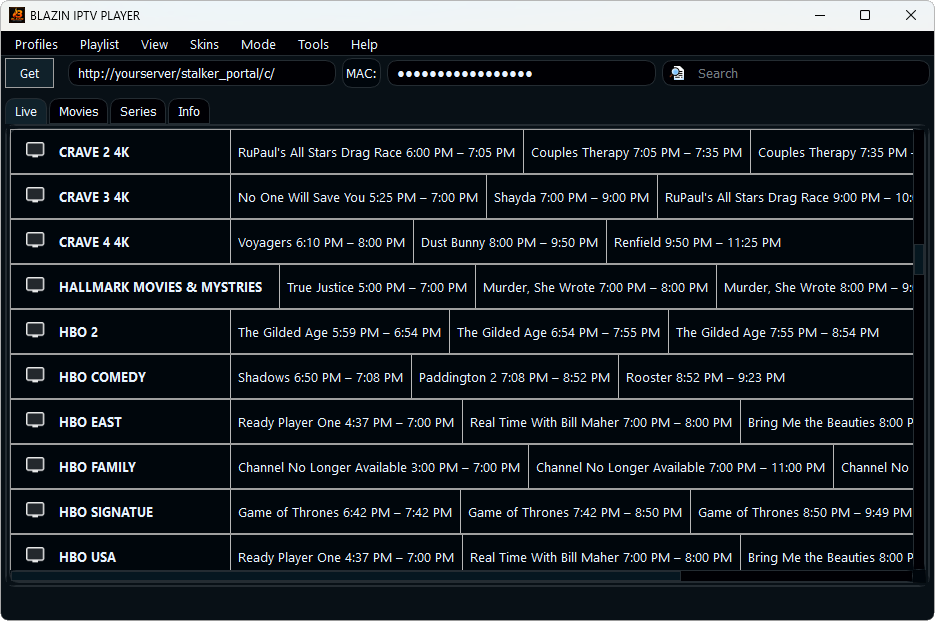
It is built for Windows users who want a desktop IPTV app with live TV categories, movie and series browsing when supported, electronic program guide data, internal VLC-based playback, optional external media player playback, profile management, search, favorites, and multiple visual themes.
BLAZIN IPTV Player does not provide channels, playlists, accounts, subscriptions, or copyrighted content.

One IPTV player for the most common Windows IPTV source types
Many IPTV users switch between separate apps for M3U playlists, Xtream Codes, STB MAC, and Stalker Portal sources. BLAZIN IPTV Player brings those workflows into one Windows desktop player while keeping the interface small enough for laptops and comfortable for desktop use.
M3U and M3U Plus
Load a local M3U file, paste an M3U URL, or use compatible M3U Plus playlist details. This makes the app useful for people searching for an M3U player for Windows that feels like a native desktop app.
Xtream Codes Login
Use server, username, and password credentials for compatible Xtream Codes sources. Profiles help you save connection details and switch between authorized sources.
STB MAC and Stalker
Connect compatible STB MAC and Stalker Portal sources with advanced profile options for portals that require specific device-style settings.
EPG Guide Support
Browse electronic program guide information when your source includes EPG data. A guide makes live TV navigation easier than a plain playlist.
Internal VLC Playback
Use built-in VLC-based playback or configure an external media player such as VLC for Windows when your setup requires it.
Small Desktop Footprint
The interface is designed for Windows users who want a compact IPTV player that does not take over the entire screen.
A desktop app for playlists, portals, and guide data
An IPTV player for Windows is software that organizes and plays streams from a source you provide. Some users have an M3U playlist, some have M3U Plus details, some use Xtream Codes credentials, and others use compatible STB MAC or Stalker Portal sources. BLAZIN IPTV Player is built to support those common workflows in one Windows desktop interface.
Unlike mobile-first IPTV apps, a Windows IPTV player should be comfortable with a mouse, keyboard, external monitors, window resizing, and local desktop media player options. BLAZIN IPTV Player focuses on that PC workflow: profiles, categories, search, favorites, live TV, movies, series when supported, and EPG navigation.
Supported source types
- M3U playlist files
- M3U playlist URLs
- M3U Plus sources
- Xtream Codes server, username, and password
- Compatible STB MAC portals
- Compatible Stalker Portal sources
- EPG data when available from your source

Use the source format that matches your legal provider
IPTV source formats are not all the same. M3U is usually a playlist file or URL. M3U Plus may include richer category information. Xtream Codes usually uses a server URL, username, and password. STB MAC and Stalker Portal setups usually require a portal URL and MAC-style profile information.
BLAZIN IPTV Player gives each workflow its own path so users do not need to force one source format into the wrong type of player. This helps users searching for an Xtream Codes player for Windows, an STB MAC player for Windows, a Stalker Portal player, or a straightforward M3U player for Windows.
Guide data and VLC-based playback for Windows
Electronic program guide support can make a large live TV list easier to browse because guide data adds program names, schedules, and context when available from your source. BLAZIN IPTV Player includes EPG support for compatible sources and keeps the guide inside the desktop workflow.
Playback is built around VLC-based internal playback, with optional external media player support for users who prefer a separate VLC install or another configured player. This gives Windows users more flexibility than a fixed player-only design.

Windows IPTV player guides
Use these pages to learn which IPTV source type matches your setup and how BLAZIN IPTV Player handles each format.
M3U Player for Windows
Learn how M3U playlists work in a Windows IPTV player.
M3U Plus Player for Windows
Use M3U Plus sources with richer playlist organization.
Xtream Codes Player for Windows
Use server, username, and password credentials for compatible sources.
STB MAC Player for Windows
Learn about portal-style STB MAC workflows on Windows.
Stalker Portal Player for Windows
Connect compatible Stalker Portal sources.
IPTV Player with EPG
Browse live TV with guide data when available.
IPTV Smarters Alternative for Windows
Compare a compact Windows desktop workflow with TV and mobile-first designs.
TiviMate Alternative for Windows
Learn why Windows users may want a desktop IPTV app instead of an Android TV-first player.
VLC IPTV Player for Windows
Use VLC-based playback with playlist, category, and profile tools.
Windows IPTV Player FAQ
What is the best IPTV player for Windows?
The best IPTV player for Windows depends on the source you use. BLAZIN IPTV Player focuses on M3U, M3U Plus, Xtream Codes, STB MAC, Stalker Portal, EPG support, themes, and VLC-based playback in one Windows desktop app.
Does BLAZIN IPTV Player include channels?
No. BLAZIN IPTV Player is a media player only. It does not provide channels, playlists, accounts, subscriptions, or copyrighted content.
Can I use BLAZIN IPTV Player on Windows 11?
Yes. BLAZIN IPTV Player is designed for Windows desktop use, including Windows 11 and Windows 10.
Does it support M3U playlists?
Yes. You can use compatible local M3U files, M3U URLs, and M3U Plus sources that you are authorized to access.
Does it support Xtream Codes?
Yes. Compatible Xtream Codes sources can be used with server URL, username, and password credentials.
Does it support STB MAC and Stalker Portal?
Yes. The app includes STB MAC and Stalker Portal profile workflows for compatible legal sources.
Can I use VLC with this IPTV player?
The app includes VLC-based internal playback and can also be configured to use external players such as VLC when needed.
Is BLAZIN IPTV Player for legal content only?
Yes. Users must provide their own legal playlists, portals, or accounts and must have permission to access the content they load.
Download BLAZIN IPTV Player for Windows
Install the Windows desktop IPTV player from the Microsoft Store and connect your own legal playlist, portal, or account source.