Detailed Windows comparison

BLAZIN IPTV Player vs IPTVnator for Windows

This guide is for Windows users who are deciding between BLAZIN IPTV Player and IPTVnator. Both can be part of a bring-your-own-source IPTV setup, but their public positioning is different: BLAZIN concentrates on a Windows desktop workflow, while IPTVnator is presented as a cross-platform IPTV player.

The useful question is not which name is universally better. It is which workflow matches your source type, the computers you use, and the way you browse and play content. IPTVnator public materials mention M3U and M3U8 playlists, imports by remote URL or local file, XMLTV EPG by URL, Xtream Codes API, and Stalker Portal support. Exact availability can vary by release and platform. BLAZIN's comparison details below come from its current product brief.

Start with your real source and device. Compare the exact app versions using your own authorized playlist or login. Source data and platform versions can change the result.

Quick comparison

Key workflow differences at a glance

This is a practical Windows workflow comparison between BLAZIN IPTV Player and IPTVnator. It focuses on how each player handles source setup, browsing, guide data, and playback rather than trying to name one universal winner.

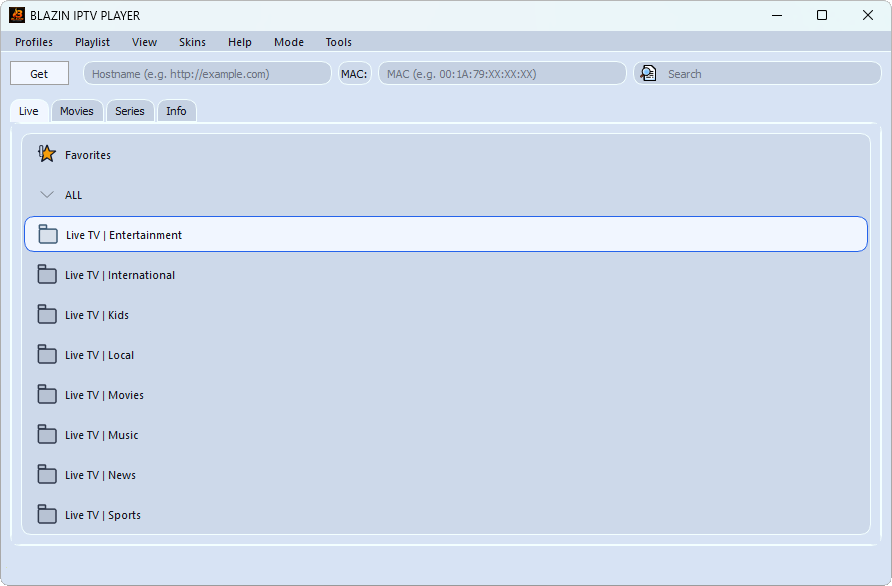
BLAZIN IPTV Player desktop interface for an IPTVnator comparison
FeatureBLAZIN IPTV PlayerIPTVnator
Product focusWindows-first IPTV playerCross-platform, open-source IPTV player
Windows versionsWindows 10 and Windows 11Official downloads include Windows, macOS, and Linux
M3U / M3U8M3U playlists, including local files and remote URLsPublic materials mention M3U/M3U8 playlists
Playlist fileSupportedPublic materials mention local-file import
Playlist URLM3U and M3U Plus URLsPublic materials mention remote-URL import
Xtream CodesSupportedPublic materials mention Xtream Codes API; availability may vary
STB MACDedicated STB MAC login workflowOfficial materials document Stalker Portal/STB support; a separate BLAZIN-style STB MAC form was not verified
Stalker PortalSupported with advanced compatibility fieldsSupported in current official materials
EPG / XMLTVEPG when compatible data is supplied by the user's sourcePublic materials mention XMLTV EPG by URL
Content sectionsLive TV, Movies, and SeriesOfficial materials show Live TV, Movies, Series, and categories
Search and favoritesBoth includedOfficial materials document global search and favorites/recently viewed
Logos and postersShown when supplied by the sourceOfficial screenshots show source artwork and optional metadata features
External playersVLC, MPC-HC, and MPC-BE style workflowsDesktop app documents MPV and VLC launching; the self-hosted PWA has limitations
Compatibility controlsCustom user agent and advanced Stalker/STB fieldsNot verified in the official feature overview; check the current version
Distribution7-day free trial through Microsoft StoreOpen-source project with official desktop downloads
IPTV content includedNo channels, playlists, subscriptions, or provider accountsNo; IPTVnator explicitly says it provides no playlists, channels, EPG data, or content

Quick verdict: BLAZIN IPTV Player vs IPTVnator

The biggest distinction is platform emphasis. BLAZIN is Windows-first and concentrates on desktop IPTV workflows for Windows 10 and Windows 11, including Windows file selection, saved source profiles, and external player paths.

IPTVnator is a cross-platform IPTV player. That broader approach may be valuable when a user wants a familiar player across more than one operating system, while BLAZIN may be more natural for a Windows-only setup.

Both players can be useful. The practical result depends on the user's legal source, required login format, preferred EPG method, devices, and playback habits. Testing current versions with the same source is more useful than comparing names alone.

Decision guide

Where BLAZIN IPTV Player may fit better

Your main device is a Windows PC

BLAZIN is built specifically for Windows 10 and Windows 11. That focus is relevant if you want a compact desktop layout, Windows file selection, saved profiles, and familiar external-player paths rather than one interface designed to span several operating systems.

You use portal-style credentials

BLAZIN has dedicated STB MAC and Stalker Portal workflows. It also exposes custom user agent settings and advanced Stalker/STB compatibility fields for sources that require more than a basic portal URL and MAC address.

You want a choice of playback paths

BLAZIN includes an internal player, but it can also hand playback to external Windows players. Users with VLC, MPC-HC, or MPC-BE setups can keep those playback preferences while using BLAZIN for source organization.

A balanced comparison

Where IPTVnator may fit better

You need the same player on several operating systems

IPTVnator's cross-platform positioning may be a stronger match if moving between Windows and other supported systems is more important than a Windows-specific experience.

Your setup centers on M3U/M3U8 and XMLTV URLs

IPTVnator publicly highlights playlist import from a local file or remote URL and XMLTV EPG by URL. A user whose workflow is already organized around those inputs may prefer that direct model.

You already know its interface

If IPTVnator already works reliably with your authorized source, changing players may offer little practical benefit. Compare current releases using the tasks you perform most.

Recommendation

Which one should Windows users choose?

Choose BLAZIN when Windows is the primary platform and the deciding features are a dedicated STB MAC workflow, custom user-agent settings, advanced portal compatibility fields, MPC-HC/MPC-BE handoff, or a Microsoft Store trial. Choose IPTVnator when an open-source, cross-platform player and its documented MPV/VLC desktop workflow are more important.

Neither choice supplies content. Use the current desktop builds with the same legal source and compare login success, EPG mapping, library organization, and playback before deciding.

Detailed review

Feature-by-feature comparison

Playlist and login choices

BLAZIN accepts local M3U files, standard M3U URLs, M3U Plus URLs, Xtream Codes credentials, STB MAC portals, and Stalker Portal details. IPTVnator public materials describe M3U/M3U8 files and URLs and also mention Xtream Codes API and Stalker Portal support. For IPTVnator, confirm the exact version and platform before depending on a particular login method.

Portal compatibility

The largest workflow difference may appear with portal sources. BLAZIN documents STB MAC login, Stalker Portal login, a custom user agent, and additional compatibility fields. IPTVnator publicly mentions Stalker support, but users should consult its current documentation rather than assume every advanced field has a direct equivalent.

Browsing and metadata

Both players document substantial organization features. BLAZIN includes source-provided Live TV, Movies, Series, categories, search, favorites, EPG, logos, and posters. IPTVnator's official materials show Live categories, Movies, Series, global search, favorites, recent items, EPG views, and source artwork.

Playback

BLAZIN supports internal playback and external VLC, MPC-HC, or MPC-BE style workflows. IPTVnator's Electron desktop app documents MPV and VLC launching, and recent materials describe embedded MPV on supported systems. Its self-hosted browser version does not include every desktop playback feature.

PC experience

Windows desktop workflow

On Windows, BLAZIN keeps connection profiles, browsing, guide information, favorites, search, themes, and playback selection in one desktop application. Local M3U users can choose a file with the Windows file picker, while URL and portal users can save the relevant connection details as profiles.

IPTVnator's cross-platform design can be an advantage, not a flaw. The decision comes down to whether consistency across systems or deeper emphasis on a Windows-specific setup is more valuable to you. Test both with the same authorized source and compare category loading, EPG mapping, search, and playback stability.

Bring your own source

Supported source types

For BLAZIN, supported inputs include a local M3U playlist file, an M3U playlist URL, an M3U Plus URL, Xtream Codes login details, an STB MAC portal, or a Stalker Portal login. The source determines which channels and sections appear.

IPTVnator's official repository documents M3U/M3U8 imports from remote URLs or local files, XMLTV EPG by URL, Xtream Codes, and Stalker Portal/STB support. Desktop and self-hosted browser builds do not have identical capabilities, so verify the build you plan to use.

Test the same lawful source in the current versions and check categories, guide times, artwork, and playback.

Important legal note

Legal and source requirements

Both products should be used as players for sources the user is authorized to access. IPTVnator's official site explicitly says it does not provide, host, or sell playlists, channels, EPG data, or media content.

BLAZIN IPTV Player does not provide IPTV channels.

BLAZIN IPTV Player does not provide playlists.

BLAZIN IPTV Player does not provide subscriptions.

BLAZIN IPTV Player does not provide provider accounts.

Users must provide their own legal IPTV source.

FAQ

Questions to consider before choosing

Is BLAZIN IPTV Player affiliated with IPTVnator?

No. They are separate IPTV player projects with different product positioning.

Does IPTVnator support Xtream Codes and Stalker Portal?

IPTVnator public materials mention Xtream Codes API and Stalker Portal support. Confirm availability in the current version and on your platform.

Which player is better for Windows 11?

BLAZIN is specifically focused on Windows 10 and 11. IPTVnator may fit better when cross-platform consistency is the priority. Test the workflows you need.

Will EPG and artwork always appear?

No. In BLAZIN, EPG, logos, and posters depend on compatible data from the user's source. Other players also depend on the data they receive and how the current version interprets it.

Can BLAZIN use an external player?

Yes. Windows users can browse in BLAZIN and send playback to VLC, MPC-HC, or MPC-BE, or stay with the internal player.

Related guides

Continue comparing Windows IPTV workflows

Microsoft Store

Test BLAZIN IPTV Player on your Windows PC

Use the trial to compare BLAZIN with the current IPTVnator release using the same authorized source and Windows device.