
Login and categories
Confirm your server URL and credentials load correctly, then check the Live TV, Movie and Series categories your source returns.
BLAZIN IPTV Player lets you use your own legal Xtream Codes login directly on a Windows PC. Enter the server URL, username and password supplied by your source, then browse compatible Live TV, Movies, Series, categories, EPG, logos and posters without running an Android emulator.
Xtream update • Version 1.1.18.0
The current BLAZIN release reworks Xtream Codes EPG loading and handling, with faster category navigation and updated Movies and Series browsing for sources that provide those sections.
Your provider still controls the channels, guide coverage, artwork, and metadata that are available.
Xtream Codes on PC
When your legal IPTV source supplies a server address, username and password, BLAZIN provides a dedicated Xtream Codes profile instead of requiring an Android app or emulator. Save the profile and use a Windows-first interface built for keyboard, mouse and desktop viewing.
Compatible source data can be organized into separate Live TV, Movies and Series areas, with categories, EPG, search, favorites and artwork where the source supplies them.
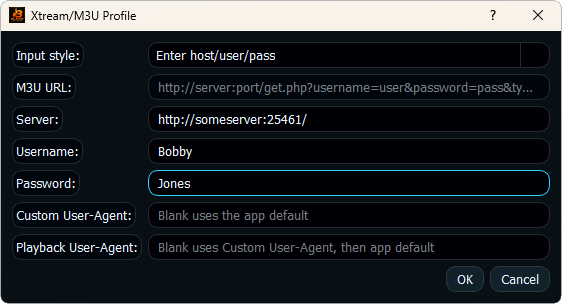
Windows workflow
Confirm your server URL and credentials load correctly, then check the Live TV, Movie and Series categories your source returns.
Check program guide coverage, channel logos and posters. These depend on the metadata supplied by your source.
Test BLAZIN's internal player or an external Windows player workflow such as VLC, MPC-HC or MPC-BE.
Xtream vs M3U
Use Xtream Codes when your source gives you a server URL, username and password. If it instead gives you a playlist file or M3U URL, use the M3U IPTV Player for Windows workflow. Both can be tested in the same native Windows application.
For guide-focused use, see the IPTV Player with EPG for Windows guide. For all supported connection types, return to the Windows IPTV Player overview.
FAQ
Yes. BLAZIN is a native Windows application and accepts user-provided legal Xtream Codes login details directly.
You need the server URL, username and password supplied by your legal source.
No. BLAZIN is player-only software and does not provide credentials, subscriptions, channels or provider accounts.
Yes, when your source returns compatible EPG data. BLAZIN displays the guide information supplied by that source.
Microsoft Store
Install BLAZIN on Windows 11 or 10 and test your own legal source before deciding.