
Live TV and categories
Channels and category groups appear when your authorized portal returns compatible data. Search and favorites help organize larger channel lists.
BLAZIN IPTV Player provides a native Windows workflow for users who already have authorized Stalker Portal or MAC Portal details. Run the player directly on Windows 10 or Windows 11 without an Android emulator, save your portal profile, and browse source-provided Live TV, Movies, Series, categories, EPG and artwork when available.
Stalker update • Version 1.1.18.0
Version 1.1.18.0 improves Stalker Portal EPG loading and reliability while continuing to optimize category loading and Movies/Series browsing for compatible authorized portals.
Program data, artwork, categories, and VOD metadata remain dependent on what your portal returns.
Stalker & MAC Portal on PC
Some IPTV applications are designed primarily for phones, Android TV devices, or set-top boxes. BLAZIN is a Windows desktop application, so an authorized Stalker or MAC Portal source can be managed directly on a Windows PC without installing an Android emulator.
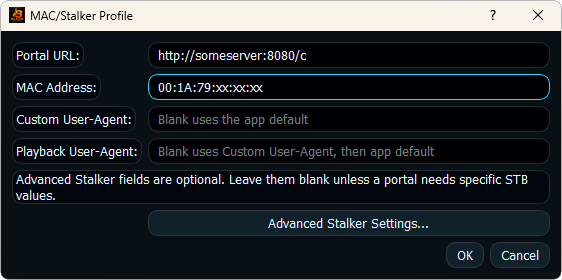
Portal systems can require a specific URL, MAC-style identity, request user agent, or device profile values. Enter only the values assigned to your authorized source, then save the profile for reuse.
Source-provided data
Channels and category groups appear when your authorized portal returns compatible data. Search and favorites help organize larger channel lists.
VOD and episodic sections can be displayed when those sections and playback details are returned by the portal.
Program guide listings, channel logos and posters are displayed when compatible metadata is supplied by your source.
MAC Portal compatibility
If your authorized source uses a portal URL with MAC-style account information, BLAZIN provides dedicated STB MAC and Stalker Portal workflows. This avoids forcing portal details into an M3U or Xtream Codes login type.
For a dedicated MAC-style setup overview, see the STB MAC Player for Windows guide.
Compatibility checks
Begin with the basic portal profile. Add user-agent, device, version, or related compatibility fields only when your source documentation requires specific values.
Windows workflow
Use the trial with the same Windows PC and authorized portal source you plan to use later. Confirm category loading, channel playback, EPG coverage, search, favorites, Movies and Series where supplied, and artwork. BLAZIN also supports internal playback and external Windows player workflows, giving you a chance to compare playback options before deciding.
If you are comparing source types, the Windows IPTV Player guide explains how Stalker Portal fits alongside M3U, Xtream Codes and STB MAC in BLAZIN.
Related setup pages
Review the related portal and MAC-style Windows workflow.
Learn how compatible guide data is displayed on Windows.
See the complete BLAZIN source and playback workflow without an emulator.