
M3U and M3U Plus
Guide information can be associated with a playlist when your source provides compatible EPG data. See the M3U player for Windows guide.
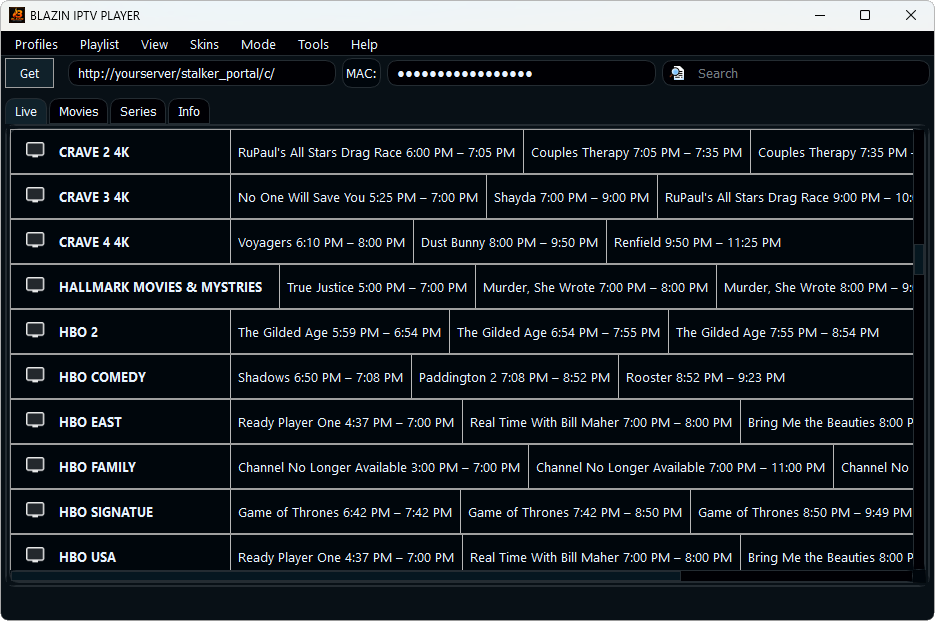
BLAZIN IPTV Player displays compatible EPG and TV guide information supplied by your own legal IPTV source. Browse what is on now and next alongside Live TV categories, channel logos, search and favorites in a native Windows application.
EPG update • Version 1.1.18.0
BLAZIN v1.1.18.0 focuses directly on guide reliability: EPG loading and handling were reworked for Xtream Codes and Stalker Portal so compatible Live TV guide data can load more consistently.
BLAZIN displays guide information supplied by your source; it does not provide TV listings or channels itself.
Windows TV guide
EPG turns a channel list into a useful TV guide by showing program information when your source supplies compatible data. BLAZIN connects that guide information with categories, search and favorites so you can find channels and programs faster on a Windows PC.
Connection types
Guide information can be associated with a playlist when your source provides compatible EPG data. See the M3U player for Windows guide.
Compatible account sources can return EPG together with Live TV categories. See the Xtream Codes IPTV player for Windows.
Portal sources may provide program information for available channels depending on the source.
BLAZIN can display compatible guide information returned by authorized Stalker Portal sources.
Troubleshooting
If no guide appears, your source may not provide EPG or its guide data may not match the channel identifiers. If only some channels have listings, coverage may be incomplete. Program times also depend on the source data and device settings.
The 7-day trial lets you check the channels you actually use before deciding. Compare guide coverage, timing, logos and category matching on your own Windows PC.
FAQ
No. BLAZIN displays compatible guide information supplied by your own legal source.
Yes, when the source provides compatible guide information.
The source may have incomplete EPG coverage or channel-to-guide matching.
Yes. Use the 7-day Microsoft Store trial with your own legal source.
Microsoft Store
Load your own legal source and check its guide coverage during the 7-day trial.