
Windows-first setup
BLAZIN runs directly on Windows 10 and Windows 11, so users can manage their legal portal source from a desktop app instead of relying on a separate set-top interface.
BLAZIN IPTV Player gives Windows users a dedicated STB MAC workflow for legal portal-style sources. If your source provides a portal URL and MAC-style details, BLAZIN helps you test that setup on a Windows desktop or laptop with profiles, categories, EPG when available, internal playback, external player workflows, custom user agent settings, and advanced compatibility fields.
STB MAC update • Version 1.1.18.0
The current release continues the performance work around portal category loading and adds updated Movies and Series stacked-card browsing with artwork and descriptions when your authorized source provides them.
Advanced compatibility fields remain available for portals that require specific STB profile values.
Portal workflow
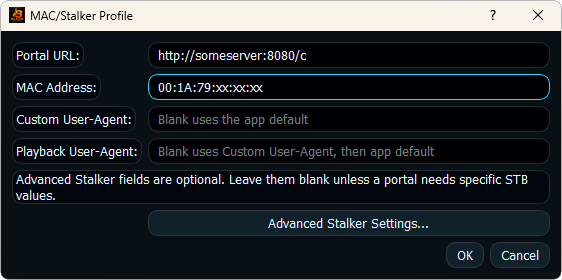
STB MAC workflows are different from normal M3U playlists. Instead of a playlist file or Xtream username and password, the setup commonly revolves around a portal URL and MAC-style details. BLAZIN provides a Windows profile path for that source type so users can test portal access without turning the whole workflow into a mobile or set-top-box experience.
The value of BLAZIN is in the compatibility controls and the PC browsing experience. When your source responds correctly, you can use the same Windows player tools around categories, search, favorites, guide data, logos, artwork, internal playback, and external player workflows.
Compatibility
Portal-style sources can be picky. BLAZIN includes compatibility fields so legitimate users can test the exact settings their source expects.
| Setup area | What it means | How BLAZIN helps | What to verify |
|---|---|---|---|
| Portal URL | The base address used by the portal-style source. | Keeps the portal in a reusable profile. | Correct URL, protocol, path, and active source access. |
| MAC-style detail | The identifier supplied for the STB-style workflow. | Allows STB MAC profile testing inside the Windows app. | Correct format and active authorization from the legal source. |
| User agent | The request identity expected by some portals. | Lets users set a custom request user agent when required. | Only use values required by your own legal source. |
| Advanced fields | Optional compatibility values such as STB type, app version, serial/device fields, and similar portal details. | Gives more control for real-world portal compatibility testing. | Values should match the source's legitimate setup requirements. |
| Playback | Internal or external player workflow. | Lets you compare built-in playback with VLC or MPC-style external playback on Windows. | Source stream availability and player behavior. |
BLAZIN fit
BLAZIN runs directly on Windows 10 and Windows 11, so users can manage their legal portal source from a desktop app instead of relying on a separate set-top interface.
Custom user agent and advanced STB/Stalker-style fields give users more ways to match the compatibility requirements of their source.
If the portal returns compatible categories, EPG, logos, posters, Movies, or Series, BLAZIN can organize that data into a practical Windows IPTV workflow.
Setup checklist
Troubleshooting
When to choose this page
STB MAC is the right page when your legal source gives you portal access rather than a normal playlist or Xtream login. That difference matters because portal-style sources can require a specific client identity, URL path, MAC-style value, or advanced compatibility detail. BLAZIN keeps those settings in a Windows profile so you can test them without mixing them into unrelated M3U or Xtream workflows.
If you are unsure whether your setup is STB MAC or Stalker Portal, review both this page and the Stalker Portal page. They are related, but BLAZIN separates the workflows so users can match the setup their source actually provides.
This page explains what the user needs, what BLAZIN can organize after loading, what advanced controls are for, and how STB MAC setup connects back to the main BLAZIN Windows IPTV Player workflow.
It should help a Windows user decide whether BLAZIN is the right way to test that legal source during the 7-day trial.
FAQ
No. BLAZIN does not provide portals, subscriptions, channels, playlists, or provider accounts. Users must provide their own legal IPTV source.
You usually need the portal URL and MAC-style login details from your legal source. Some sources may also require specific user agent or compatibility values.
Real portal setups can vary. Advanced fields help users test compatibility values their legitimate source requires.
They can only show EPG, logos, and artwork when the source provides compatible data.
Related BLAZIN guides
These pages connect this source type to the rest of the BLAZIN IPTV Player website, including the main Windows product page, the buyer guide, and related source workflows.
Continue the BLAZIN IPTV Player website flow with this related Windows IPTV guide.
Continue the BLAZIN IPTV Player website flow with this related Windows IPTV guide.
Continue the BLAZIN IPTV Player website flow with this related Windows IPTV guide.
Microsoft Store
Install the Windows app, add your own legal IPTV source, and test the source workflow on your PC before deciding.
No channels, playlists, subscriptions, provider accounts, or copyrighted content are included.