
No Android emulator layer
BLAZIN runs directly on Windows 11, so you do not have to install an Android emulator just to manage a playlist or portal source on your PC.
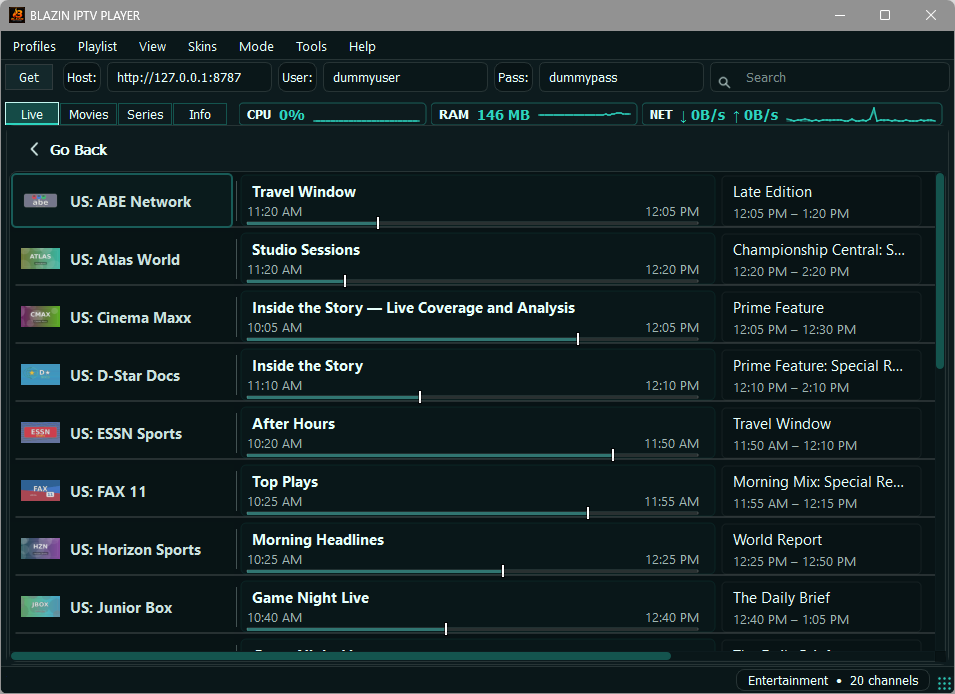
BLAZIN IPTV Player gives Windows 11 users a native desktop way to load their own legal IPTV source. Use M3U, M3U Plus, Xtream Codes, STB MAC, or Stalker Portal details, then browse source-provided Live TV, Movies, Series, EPG, categories, logos, posters, search, and favorites without running an Android emulator.
Windows 11 workflow
Windows 11 users often try Android apps through an emulator or use a general media player to open a playlist. Those workflows can work for certain users, but they are not the same as using a dedicated Windows IPTV app. BLAZIN is designed for the desktop habits Windows users already have: keyboard and mouse navigation, resizable windows, profiles, screenshots, external players, and a setup flow that matches common IPTV source types.
The app is especially useful when your source contains more than a simple channel list. If your source provides categories, EPG, channel logos, Movies, Series, or posters, BLAZIN gives those items a structured place in the Windows interface.
Windows 11 advantages
BLAZIN runs directly on Windows 11, so you do not have to install an Android emulator just to manage a playlist or portal source on your PC.
Use categories, search, favorites, and separate Live TV, Movies, and Series sections when the source provides those items.
Test internal playback or launch external player workflows such as VLC, MPC-HC, or MPC-BE depending on your display and playback preferences.
Source compatibility
| Windows 11 need | What it means | How BLAZIN handles it |
|---|---|---|
| Playlist files | You have a local M3U file saved on the PC. | Open the file and browse the entries supplied by the playlist. |
| Remote playlist URLs | You have an M3U or M3U Plus address from your legal source. | Paste the URL and load compatible categories, metadata, and sections where provided. |
| Xtream Codes login | Your source gives you a server URL, username, and password. | Use the dedicated Xtream Codes profile workflow on Windows 11. |
| STB MAC login | Your source expects a portal and MAC-style login. | Use the STB MAC workflow instead of a set-top box-style interface. |
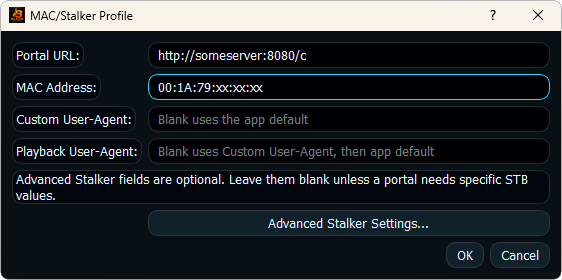
| Stalker Portal details | Your legitimate source requires Stalker-style portal information. | Use Stalker Portal support, custom user agent, and advanced compatibility fields where needed. |
For real Windows devices
A Windows 11 IPTV player should work well beyond one viewing style. You may use a laptop while traveling, a desktop monitor at home, a Surface-style touchscreen, or a Windows PC connected to a larger display. BLAZIN keeps the main workflow inside a compact desktop interface while still giving you theme options and external player flexibility.
That makes the 7-day trial important. You can test how your own source behaves on the exact Windows device you use most, including whether categories switch quickly, whether the EPG appears, whether posters load, and whether internal or external playback feels better for your setup.
Organization
When your source exposes these sections, BLAZIN keeps them separate so Windows users do not have to scroll through everything in one mixed list.
Program guide data, logos, posters, and series artwork can make a source easier to browse. BLAZIN displays compatible metadata, but the data must come from your own source.
Use search to find items faster and favorites to keep frequently used channels, movies, or series easier to return to.
Custom user agent and advanced Stalker/STB fields help legitimate users test compatibility values required by certain portal setups.
Trial checklist
Best fit
BLAZIN is a better fit than an emulator workflow when you want IPTV management to feel like a normal Windows application.
The app is useful when you need to test M3U, M3U Plus, Xtream Codes, STB MAC, or Stalker Portal without jumping between different tools.
The 7-day Microsoft Store trial lets you confirm the app works with your real source, device, and playback preferences first.
FAQ
Yes. BLAZIN IPTV Player is a native Windows app and does not require an Android emulator.
Yes. BLAZIN IPTV Player supports Windows 10 and Windows 11.
You can use your own legal M3U file, M3U URL, M3U Plus URL, Xtream Codes login, STB MAC login, or Stalker Portal details.
The app is designed for Windows desktop use, including laptops and compact windows, with categories, search, favorites, and themes to help navigation.
No. Windows 11 support only describes the app platform. BLAZIN does not provide channels, playlists, subscriptions, or provider accounts.
Related guides
See the full BLAZIN product workflow for Windows 10 and Windows 11.
Use the buyer checklist to compare IPTV player features before choosing.
Compare native Windows IPTV use with Android emulator workflows.
Microsoft Store
Install the Windows app, add your own legal IPTV source, and test the supported workflow on your own PC before deciding.
No channels, playlists, subscriptions, provider accounts, streams, or copyrighted content are included.