

Source-dependent guide
EPG appears when compatible data is supplied by your source.
EPG support in BLAZIN IPTV Player depends on compatible guide data from your own legal IPTV source.
Windows IPTV guide
EPG guide data is one of the most useful parts of a Windows IPTV setup, but it is also one of the most source-dependent. If a playlist or portal does not provide compatible program information, a player cannot invent an accurate TV guide.
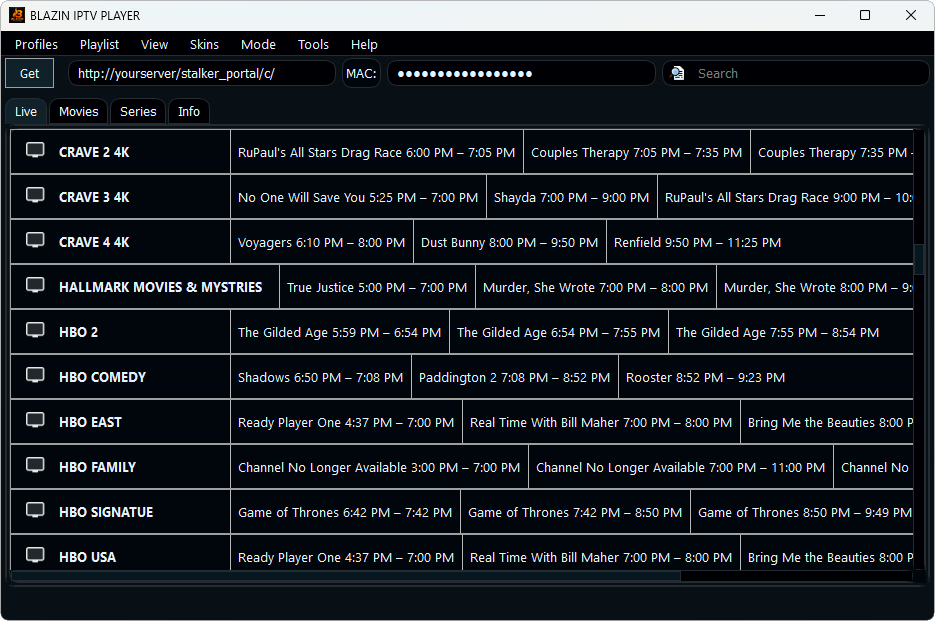
BLAZIN IPTV Player can display EPG/TV guide data when the user’s legal source supplies it. The right test is to load your real source, check several categories, and confirm whether schedules match the channels you actually use.
Why BLAZIN fits this workflow
EPG appears when compatible data is supplied by your source.
Test guide data across M3U, Xtream Codes, STB MAC, and Stalker Portal workflows.
Use the guide alongside Live TV when available.
Check whether guide data follows the categories returned by your source.
Use favorites to keep guide-supported channels easier to find.
Use the 7-day trial to verify real guide behavior.
Practical comparison
The details that matter for loading epg guide data on windows are practical: whether your source loads, what metadata appears, how quickly you can browse, and whether the player gives you control over playback and compatibility. BLAZIN is designed to make those checks visible inside a Windows desktop workflow.
| Decision point | What Windows users should check | How BLAZIN IPTV Player helps |
|---|---|---|
| Source data | Does your playlist or portal include EPG? | BLAZIN displays compatible guide data when supplied. |
| Channel matching | Do guide entries match channel names? | Test several channels because matching depends on the source data. |
| Live TV browsing | Can you use guide data while browsing? | BLAZIN supports EPG-oriented Live TV workflows. |
| Logos and artwork | Are logos also supplied? | BLAZIN can show logos when the source provides them. |
| Troubleshooting | Is guide data missing? | Check source output first, then reload or test another profile. |
7-day trial checklist
Avoid setup mistakes
FAQ
No. It displays compatible guide data when your source provides it.
Many Xtream workflows can provide guide data, but availability depends on your source.
No. BLAZIN IPTV Player is player-only software. It does not provide channels, playlists, subscriptions, provider accounts, or copyrighted content.
Yes. The Microsoft Store listing includes a 7-day free trial so you can test your own legal playlist, login, EPG data, and playback workflow first.
Related BLAZIN guides
Start with the main Windows IPTV Player page and review the full BLAZIN workflow.
Compare the Windows features that matter before choosing a player.
Use the native Windows 11 guide when you do not want an emulator workflow.
Full EPG guide and source dependency explanation.
EPG-specific notes for Xtream Codes workflows.
Load local M3U files, M3U URLs, M3U8 playlists, and M3U Plus sources.
Use server URL, username, and password workflows with your own legal source.
Microsoft Store
Install the Windows app, add your own legal IPTV source, and test categories, playback, EPG, search, favorites, and source compatibility on your own PC.
BLAZIN IPTV Player is player-only software. It does not provide channels, playlists, streams, provider accounts, subscriptions, or copyrighted content.