

Source setup
Use the source format your legal provider supplies instead of forcing another workflow.
BLAZIN IPTV Player does not include a subscription. It is a Windows player for legal sources you provide yourself.
Windows IPTV guide
Some users search for an IPTV player with no subscription because they already have a legal source and only need software to organize and play it. That is the correct way to think about BLAZIN.
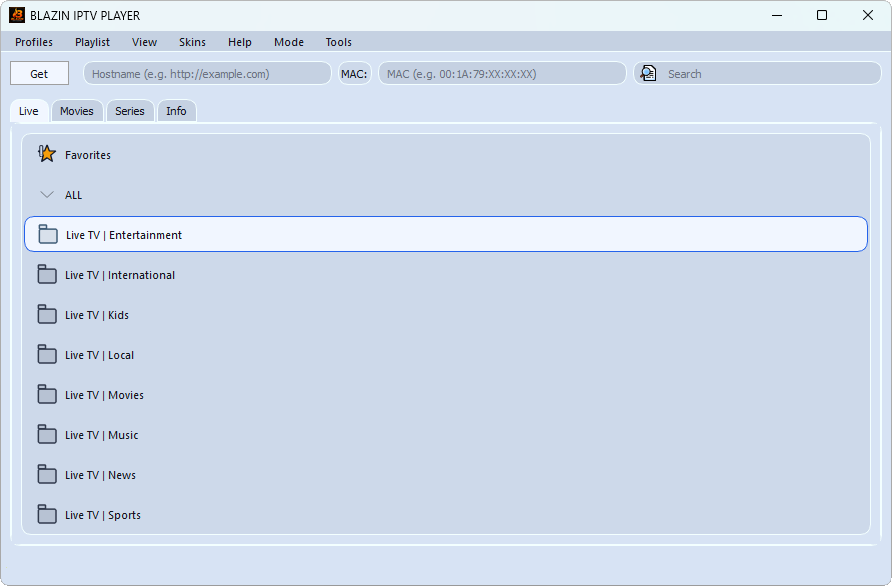
BLAZIN does not sell service. It gives you a Windows app for source setup, categories, search, favorites, guide data, artwork, and playback options when your own source supplies compatible data.
Why BLAZIN fits this workflow
Use the source format your legal provider supplies instead of forcing another workflow.
Browse categories, search, favorites, Live TV, Movies, and Series where the source provides them.
Display guide data, logos, movie posters, and series posters when compatible data is included.
Test internal playback or external VLC/MPC-style workflows.
Use custom user agent and advanced portal fields where relevant.
Test the workflow on your own Windows PC before deciding.
Practical comparison
The details that matter for no-subscription player setup are practical: whether your source loads, what metadata appears, how quickly you can browse, and whether the player gives you control over playback and compatibility. BLAZIN is designed to make those checks visible inside a Windows desktop workflow.
| Decision point | What Windows users should check | How BLAZIN IPTV Player helps |
|---|---|---|
| Source details | Do you have the exact file, URL, login, or portal information? | BLAZIN provides dedicated workflows for common source types. |
| Organization | Does the source expose groups, categories, Movies, or Series? | BLAZIN shows those structures when the source returns compatible data. |
| Guide and artwork | Does the source include EPG, logos, or posters? | BLAZIN displays compatible guide and artwork data when provided. |
| Playback | Do streams work well on your device? | Test internal playback and external VLC/MPC-style workflows. |
| Trial decision | Can you verify the workflow before paying? | Use the 7-day Microsoft Store trial with your own legal source. |
7-day trial checklist
Avoid setup mistakes
FAQ
No. It explains player software only. BLAZIN does not provide IPTV service or content.
Yes, when your own legal source supplies the required playlist, login, portal, guide, or stream data.
No. BLAZIN IPTV Player is player-only software. It does not provide channels, playlists, subscriptions, provider accounts, or copyrighted content.
Yes. The Microsoft Store listing includes a 7-day free trial so you can test your own legal playlist, login, EPG data, and playback workflow first.
Related BLAZIN guides
Start with the main Windows IPTV Player page and review the full BLAZIN workflow.
Compare the Windows features that matter before choosing a player.
Use the native Windows 11 guide when you do not want an emulator workflow.
Compare local files, URLs, M3U8 links, and M3U Plus workflows.
Review how M3U Plus can organize Live TV, Movies, Series, and categories.
Load local M3U files, M3U URLs, M3U8 playlists, and M3U Plus sources.
Use server URL, username, and password workflows with your own legal source.
Microsoft Store
Install the Windows app, add your own legal IPTV source, and test categories, playback, EPG, search, favorites, and source compatibility on your own PC.
BLAZIN IPTV Player is player-only software. It does not provide channels, playlists, streams, provider accounts, subscriptions, or copyrighted content.